Complete Guide to Async/Await in TypeScript (2026)
From Callback Hell to Modern Async Patterns — Everything a Developer Needs to Know
Asynchronous programming is at the heart of every modern application. Whether you are calling an API, reading a file, querying a database, or waiting for a user action — your code needs to handle tasks that take time without freezing the entire application. This is where async/await comes in.
Async/await was introduced in ES2017 (ES8) and completely changed how developers write asynchronous JavaScript and TypeScript. Before it existed, developers had to deal with deeply nested callbacks — a problem so common it was called "Callback Hell". Then came Promises, which improved things but still led to messy .then().catch() chains that were hard to read and debug.
Async/await solved both of these problems by letting you write asynchronous code that looks and reads like synchronous code — clean, top-to-bottom, easy to follow. And when you combine async/await with TypeScript, you also get full type safety — meaning TypeScript tells you at compile time if your async functions are returning the wrong type, before the code ever runs in production.
This guide covers everything from the very basics to advanced patterns used in real production applications in 2026. Every concept is explained clearly with code examples so that both beginners and experienced developers can follow along.
Table of Contents
- The History: Callbacks → Promises → Async/Await
- What is Async/Await? (Fundamentals)
- Basic Usage with Real Examples
- Error Handling with Try/Catch
- Typing Async Functions and Promises in TypeScript
- Advanced Pattern: Promise.all — Running Tasks in Parallel
- Advanced Pattern: Promise.allSettled — Partial Success
- Advanced Pattern: Async Iterators and for await...of
- Cancellation with AbortController
- Avoiding Common Mistakes
- Best Practices Checklist
1 The History: Callbacks → Promises → Async/Await
To truly understand why async/await matters, you need to understand the problems it solved. Let's look at how asynchronous code evolved over time.
Stage 1 — Callbacks (The Old Way)
The very first pattern for async code in JavaScript was callbacks — passing a function as an argument to be called once an async operation finishes. This worked for simple cases but quickly became unreadable when you needed to chain multiple async operations together.
// Callback Hell — 3 operations chained together
// Each level of nesting makes the code harder to read and maintain
getUserData(userId, function(user) {
  getOrders(user.id, function(orders) {
    getOrderDetails(orders[0].id, function(details) {
      console.log(details);
      // Imagine adding error handling to EVERY level — it gets very messy
    });
  });
});
Problem with Callbacks: Deep nesting makes code hard to read, test, and maintain. Error handling must be repeated at every level. This is why it was called "Callback Hell" or the "Pyramid of Doom."
Stage 2 — Promises (Better, but still verbose)
Promises improved the situation by letting you chain .then() calls instead of nesting. But long chains of .then().catch() were still hard to debug and didn't read naturally.
// Promise chaining — better than callbacks but still verbose
getUserData(userId)
  .then(user => getOrders(user.id))
  .then(orders => getOrderDetails(orders[0].id))
  .then(details => console.log(details))
  .catch(error => console.error("Something failed:", error));
Stage 3 — Async/Await (The Modern Way)
Async/await makes the exact same logic read like simple, synchronous top-to-bottom code. It is much easier to read, write, and debug.
// Async/Await — clean, readable, and easy to debug
async function loadOrderDetails(userId: number) {
  try {
    const user = await getUserData(userId);
    const orders = await getOrders(user.id);
    const details = await getOrderDetails(orders[0].id);
    console.log(details);
  } catch (error) {
    console.error("Something failed:", error);
  }
}
Key Takeaway: Async/await did not replace Promises — it is built on top of them. Every async function still returns a Promise under the hood. Async/await is just a cleaner syntax for working with Promises.
| Pattern | Readability | Error Handling | Debugging | Recommended |
|---|---|---|---|---|
| Callbacks | Poor | Manual at every level | Very difficult | ❌ Avoid |
| Promises (.then) | Medium | .catch() at end | Medium | ⚠️ Acceptable |
| Async/Await | Excellent | try/catch (familiar) | Easy | ✅ Best Practice |
2 What is Async/Await? (Fundamentals)
Before writing any code, let's clearly understand what the two keywords async and await actually do.
The async Keyword
When you add the async keyword before a function, two things happen:
- The function always returns a Promise — even if you return a plain value like a string or number, TypeScript/JavaScript automatically wraps it in a resolved Promise.
- The function is allowed to use the
awaitkeyword inside it.
// These two functions are exactly the same in behavior:

// Without async — manually returning a Promise
function greet(): Promise<string> {
  return Promise.resolve("Hello, World!");
}

// With async — TypeScript wraps the return value automatically
async function greetAsync(): Promise<string> {
  return "Hello, World!"; // Automatically wrapped in Promise.resolve()
}

// Both return a Promise that resolves to "Hello, World!"
greet().then(console.log);      // "Hello, World!"
greetAsync().then(console.log); // "Hello, World!"
The await Keyword
The await keyword can only be used inside an async function. When you put await in front of a Promise, it does this:
- It pauses the execution of the current async function.
- It waits for the Promise to resolve or reject.
- Once the Promise resolves, it returns the resolved value and execution continues.
Important: await does NOT block the entire program or the browser. It only pauses the current async function. All other code continues to run normally. This is what makes it non-blocking.
async function demonstrateAwait() {
  console.log("1 — Function starts");

  // Pauses HERE for 2 seconds, but does not block anything else
  const result = await new Promise<string>((resolve) => {
    setTimeout(() => resolve("Done waiting!"), 2000);
  });

  console.log("2 — After await:", result);
  console.log("3 — Function ends");
}

demonstrateAwait();
console.log("This runs IMMEDIATELY while the async function is waiting");

// Output order:
// "1 — Function starts"
// "This runs IMMEDIATELY while the async function is waiting"
// (2 seconds pass...)
// "2 — After await: Done waiting!"
// "3 — Function ends"
Why This Matters
Understanding that await only pauses its own function — and NOT the whole program — is one of the most important concepts in async programming. This is why async code is so powerful: your app stays responsive while waiting for slow operations like API calls or file reads.
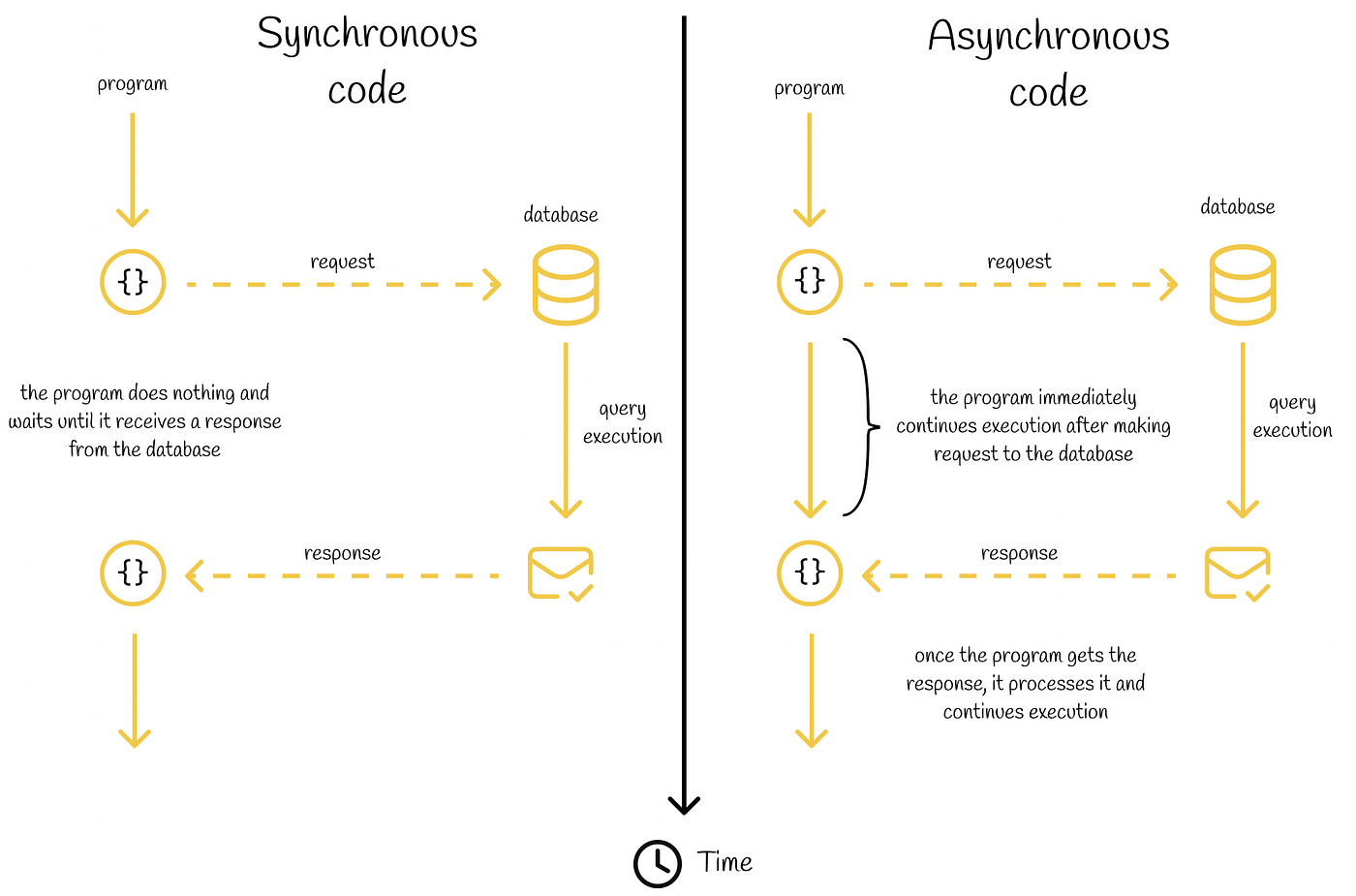
The diagram above shows how control flow works in an async function — execution pauses at each await and resumes when the Promise resolves.
3 Basic Usage with Real Examples
Let's look at practical, real-world examples of how you use async/await in TypeScript projects. These patterns cover the most common scenarios you will encounter every day.
Example 1: Fetching Data from an API
This is the most common use case. You call an external API, wait for the response, and then use the data. Notice how TypeScript forces you to define the shape of the data using an interface.
// Define the shape of the data with a TypeScript interface
interface Post {
  id: number;
  title: string;
  body: string;
  userId: number;
}

// async function with a typed return value
async function fetchPost(postId: number): Promise<Post> {
  const response = await fetch(`https://jsonplaceholder.typicode.com/posts/${postId}`);

  // Always check if the response was successful
  if (!response.ok) {
    throw new Error(`HTTP error! Status: ${response.status}`);
  }

  // .json() also returns a Promise, so we await it too
  const post: Post = await response.json();
  return post;
}

// Using the function
async function main() {
  const post = await fetchPost(1);
  console.log(post.title); // TypeScript knows .title is a string ✅
  console.log(post.id);    // TypeScript knows .id is a number ✅
}

main();
Example 2: Async Function in a TypeScript Class
In real applications, you often use async methods inside service classes. This is the pattern used in Angular services, NestJS services, and many other frameworks.
interface User {
  id: number;
  name: string;
  email: string;
}

class UserService {
  private baseUrl = 'https://jsonplaceholder.typicode.com';

  // Async method inside a class
  async getUserById(id: number): Promise<User> {
    const response = await fetch(`${this.baseUrl}/users/${id}`);
    if (!response.ok) {
      throw new Error(`Failed to fetch user with id ${id}`);
    }
    return response.json();
  }

  // Another async method that uses the first one
  async getUserName(id: number): Promise<string> {
    const user = await this.getUserById(id);
    return user.name; // TypeScript knows this is a string
  }
}

// Usage
const service = new UserService();

async function run() {
  const name = await service.getUserName(1);
  console.log(`User name: ${name}`);
}

run();
Example 3: Loading Multiple Steps in Sequence
Sometimes you need to load data step by step — where each step depends on the result of the previous one. Async/await handles this perfectly.
interface Order {
  id: number;
  userId: number;
  total: number;
}

interface OrderDetails {
  orderId: number;
  items: string[];
  shippingAddress: string;
}

async function loadUserOrderDetails(userId: number): Promise<OrderDetails> {
  // Step 1: Get the user
  const userResponse = await fetch(`/api/users/${userId}`);
  const user = await userResponse.json();

  // Step 2: Get their latest order (depends on user.id from step 1)
  const orderResponse = await fetch(`/api/orders?userId=${user.id}`);
  const orders: Order[] = await orderResponse.json();

  // Step 3: Get full details for the first order (depends on order.id from step 2)
  const detailsResponse = await fetch(`/api/orders/${orders[0].id}/details`);
  const details: OrderDetails = await detailsResponse.json();

  return details;
}

async function displayOrderDetails() {
  const details = await loadUserOrderDetails(42);
  console.log("Shipping to:", details.shippingAddress);
  console.log("Items ordered:", details.items.join(", "));
}

displayOrderDetails();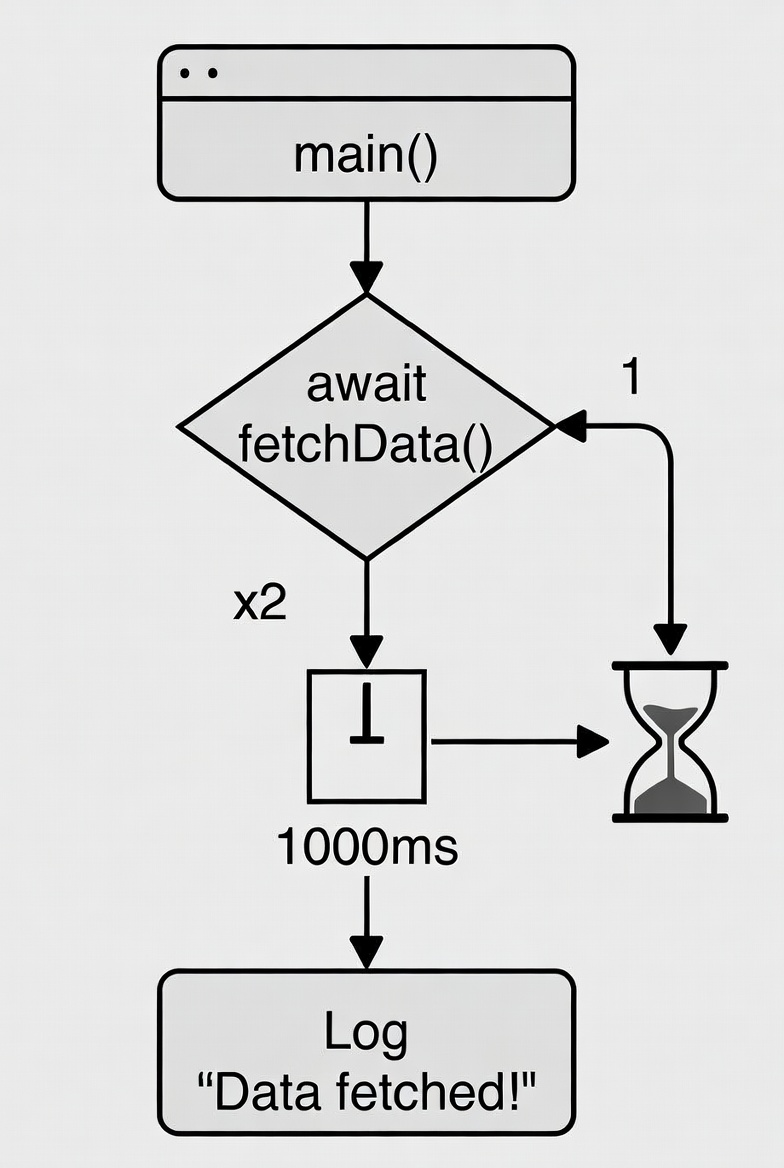
The flowchart above shows how an async function handles both the success path (resolved) and the error path (rejected), including the branches for try/catch handling.
4 Error Handling with Try/Catch
One of the biggest advantages of async/await over .then().catch() chains is that error handling feels natural. You use the same try/catch blocks that you already know from synchronous code. This makes async error handling much easier to understand and maintain.
Basic Try/Catch Pattern
async function fetchUserData(userId: number): Promise<User> {
  try {
    const response = await fetch(`/api/users/${userId}`);

    // Check for HTTP errors (404, 500, etc.) — fetch() does NOT throw on HTTP errors
    if (!response.ok) {
      throw new Error(`Server returned status: ${response.status}`);
    }

    const user: User = await response.json();
    return user;

  } catch (error) {
    // In TypeScript, the error in catch is of type 'unknown' (safer than 'any')
    // You must check its type before accessing its properties
    if (error instanceof Error) {
      console.error("Failed to fetch user:", error.message);
    } else {
      console.error("An unexpected error occurred:", error);
    }
    throw error; // Re-throw so the caller knows something went wrong
  }
}
Common Mistake — fetch() does NOT throw on HTTP errors: The native fetch() function only throws an error if the network request completely fails (no internet, server unreachable). It does NOT throw for 404 Not Found or 500 Server Error responses. You must always check response.ok manually and throw your own error if needed.
TypeScript's Error Typing — unknown vs any
In TypeScript, the caught error in a catch block is typed as unknown (in strict mode) — not any. This is actually a good thing because it forces you to check the type of the error before accessing its properties, preventing runtime bugs.
async function safeApiCall(): Promise<void> {
  try {
    await fetch("/api/data");
  } catch (error: unknown) {

    // ❌ This would cause a TypeScript error — cannot access .message on 'unknown'
    // console.error(error.message);

    // ✅ Correct — check type first with instanceof
    if (error instanceof Error) {
      console.error("Error message:", error.message);
      console.error("Stack trace:", error.stack);
    }

    // ✅ Also correct — create a reusable helper function
    console.error("Error:", getErrorMessage(error));
  }
}

// Reusable helper to safely extract error messages
function getErrorMessage(error: unknown): string {
  if (error instanceof Error) return error.message;
  if (typeof error === "string") return error;
  return "An unknown error occurred";
}
Handling Errors at Different Levels
A well-designed application handles errors at the right level. Low-level functions throw errors; high-level functions catch and handle them for the user.
// Low-level function: just throws the error, doesn't handle it
async function fetchProducts(): Promise<Product[]> {
  const response = await fetch("/api/products");
  if (!response.ok) {
    throw new Error(`Failed to load products: ${response.status}`);
  }
  return response.json();
}

// High-level function: catches the error and handles it for the user
async function loadProductsPage(): Promise<void> {
  try {
    const products = await fetchProducts();
    renderProducts(products); // Show products on screen
  } catch (error) {
    // Show a user-friendly error message instead of crashing
    showErrorMessage("Sorry, we could not load products. Please try again.");
    // Optionally log to an error monitoring service like Sentry
    logErrorToSentry(error);
  }
}
Tip: Always wrap await calls in try/catch blocks at the appropriate level. Unhandled promise rejections can crash a Node.js application or lead to silent failures in the browser. For extra safety, use the ESLint rule @typescript-eslint/no-floating-promises to automatically detect any awaited promises that are missing error handling.
5 Typing Async Functions and Promises in TypeScript
This is where TypeScript truly shines over plain JavaScript. By adding types to your async functions and Promises, the TypeScript compiler catches bugs at compile time — before your code ever runs. This is one of the most powerful features of TypeScript.
Typing the Return Value of an Async Function
Always explicitly annotate the return type of your async functions. It makes your code self-documenting and prevents accidentally returning the wrong type.
interface Product {
  id: number;
  name: string;
  price: number;
  inStock: boolean;
}

// ✅ Explicit return type: Promise<Product>
// TypeScript will error if you try to return something that doesn't match Product
async function getProduct(id: number): Promise<Product> {
  const response = await fetch(`/api/products/${id}`);
  const data = await response.json();
  return data; // TypeScript trusts you here — data is typed as Product
}

// ✅ For functions that don't return a value, use Promise<void>
async function updateProductStock(id: number, inStock: boolean): Promise<void> {
  await fetch(`/api/products/${id}`, {
    method: 'PATCH',
    body: JSON.stringify({ inStock }),
    headers: { 'Content-Type': 'application/json' }
  });
  // No return value needed — just awaiting the operation
}

// ✅ For functions that return a list, use Promise<Product[]>
async function getAllProducts(): Promise<Product[]> {
  const response = await fetch('/api/products');
  return response.json();
}
Using Generics for Reusable Async Functions
TypeScript generics allow you to write one async function that works with any data type. This is the pattern used in professional API client libraries.
// A generic fetch helper — works for any data type
async function fetchData<T>(url: string): Promise<T> {
  const response = await fetch(url);
  if (!response.ok) {
    throw new Error(`HTTP error! Status: ${response.status}`);
  }
  return response.json() as Promise<T>;
}

// Now you can use it with any type — TypeScript handles the typing automatically
const user = await fetchData<User>('/api/users/1');
// TypeScript knows 'user' is of type User ✅

const products = await fetchData<Product[]>('/api/products');
// TypeScript knows 'products' is of type Product[] ✅

const config = await fetchData<AppConfig>('/api/config');
// TypeScript knows 'config' is of type AppConfig ✅
The Awaited<T> Utility Type
TypeScript has a built-in utility type called Awaited<T> that unwraps the resolved type of a Promise. This is very useful when you need to infer a type from an existing async function.
async function fetchUser(): Promise<User> {
  return { id: 1, name: "Danish", email: "danish@example.com" };
}

// Awaited<T> extracts the resolved type from a Promise
type FetchedUser = Awaited<ReturnType<typeof fetchUser>>;
// FetchedUser = User  ✅

// This is very useful when working with third-party libraries
// where you don't have the type directly available
type ApiResponse = Awaited<ReturnType<typeof fetch>>;
// ApiResponse = Response  ✅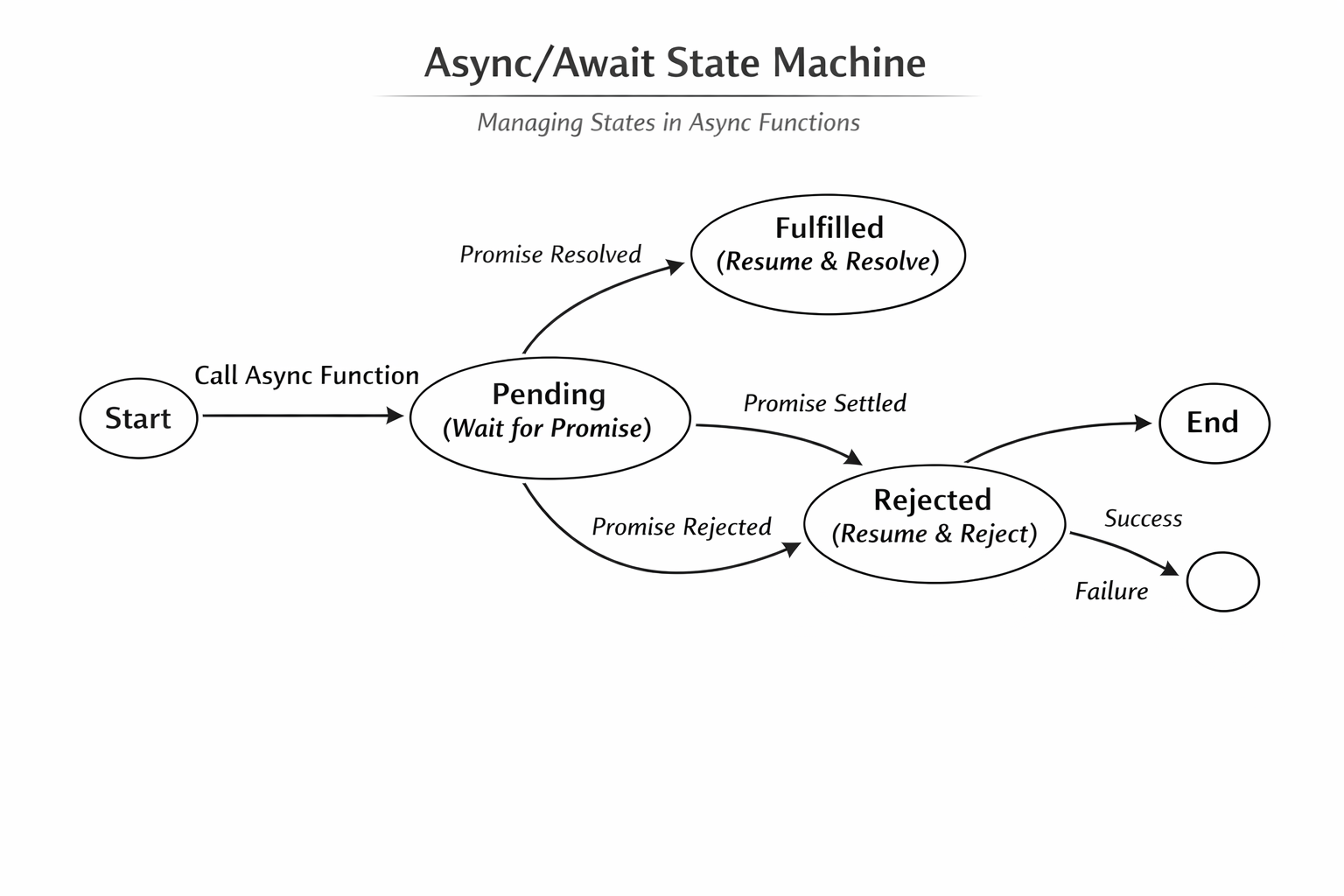
The state machine diagram above shows the three states of a Promise — Pending, Fulfilled, and Rejected — and how TypeScript enforces the expected type at each resolved state.
6 Advanced Pattern: Promise.all — Running Tasks in Parallel Important
One of the most common performance mistakes developers make with async/await is running independent operations one by one when they could be run at the same time. When tasks are independent of each other — meaning the second task does not need the result of the first — you should always run them in parallel using Promise.all.
The Problem: Unnecessary Sequential Execution
// ❌ BAD — Sequential execution when tasks are independent
// Total time: 1s + 1s + 1s = 3 seconds wasted waiting
async function loadDashboard_SLOW(userId: number) {
  const user    = await fetchUser(userId);     // Wait 1 second
  const orders  = await fetchOrders(userId);   // Wait 1 second
  const reviews = await fetchReviews(userId);  // Wait 1 second

  return { user, orders, reviews };
}
// These 3 fetches have nothing to do with each other — why wait for each one?
The Solution: Parallel Execution with Promise.all
// ✅ GOOD — Parallel execution using Promise.all
// Total time: just 1 second — all 3 requests happen at the same time!
async function loadDashboard_FAST(userId: number) {
  // Promise.all starts all 3 fetches at exactly the same time
  const [user, orders, reviews] = await Promise.all([
    fetchUser(userId),    // These all run simultaneously
    fetchOrders(userId),  // ↑
    fetchReviews(userId)  // ↑
  ]);

  return { user, orders, reviews };
}
// TypeScript correctly infers the types of user, orders, and reviews ✅
Tip: Use Promise.all whenever you have multiple async operations that do not depend on each other's results. This is one of the easiest performance wins you can get in any TypeScript application. For a dashboard that makes 5 API calls sequentially, switching to Promise.all can make it 5x faster.
Important: Promise.all Fails Fast
Promise.all has one important behavior to know: if any one of the promises fails, the entire Promise.all rejects immediately — even if all other promises succeed. This is called "fail fast" behavior.
async function loadAllData() {
  try {
    const [users, products, orders] = await Promise.all([
      fetchUsers(),    // ✅ succeeds
      fetchProducts(), // ❌ throws an error
      fetchOrders()    // ✅ would succeed, but never used
    ]);

    console.log(users, products, orders);

  } catch (error) {
    // If fetchProducts() fails, we land here
    // users and orders results are lost — even if they succeeded
    console.error("One of the requests failed:", error);
  }
}
If you need to handle each failure independently (where some can fail without affecting others), use Promise.allSettled instead — covered in the next section.
7 Advanced Pattern: Promise.allSettled — Partial Success 2026
While Promise.all fails fast when any promise rejects, Promise.allSettled waits for all promises to complete — whether they succeed or fail — and gives you the result of each one individually. This is the right tool when partial success is acceptable.
Real Example: Loading a Dashboard Where Some Widgets Can Fail
interface SettledResult<T> {
  status: 'fulfilled' | 'rejected';
  value?: T;
  reason?: unknown;
}

async function loadDashboardWidgets(userId: number) {
  // Even if some fail, we still want to show the others
  const results = await Promise.allSettled([
    fetchUserProfile(userId),
    fetchRecentOrders(userId),
    fetchRecommendations(userId),
    fetchNotifications(userId)
  ]);

  // results is an array — each item tells you if it succeeded or failed
  results.forEach((result, index) => {
    if (result.status === 'fulfilled') {
      console.log(`Widget ${index} loaded successfully:`, result.value);
    } else {
      console.warn(`Widget ${index} failed to load:`, result.reason);
      // Show a fallback/empty state for this widget instead of crashing
    }
  });
}

// A more practical TypeScript approach — destructure with types
async function loadDashboard(userId: number) {
  const [profileResult, ordersResult, recsResult] = await Promise.allSettled([
    fetchUserProfile(userId),
    fetchRecentOrders(userId),
    fetchRecommendations(userId)
  ]);

  const profile = profileResult.status === 'fulfilled' ? profileResult.value : null;
  const orders  = ordersResult.status  === 'fulfilled' ? ordersResult.value  : [];
  const recs    = recsResult.status    === 'fulfilled' ? recsResult.value    : [];

  return { profile, orders, recs };
}| Method | If one fails | Returns | Use When |
|---|---|---|---|
Promise.all |
Immediately rejects all | Array of values (all success) | ALL results are required |
Promise.allSettled |
Continues waiting for others | Array of {status, value/reason} | Partial success is acceptable |
Promise.race |
First one wins (success or fail) | Value of first settled promise | Timeout patterns, fastest response |
Promise.any |
Continues until one succeeds | Value of first fulfilled promise | Try multiple sources, use first success |
8 Advanced Pattern: Async Iterators and for await...of 2026
Async iterators allow you to work with streams of data that arrive over time — like reading a large file chunk by chunk, processing paginated API results, or handling real-time data streams. Instead of waiting for all data to arrive before processing it, async iterators let you process each piece as it becomes available.
What is an Async Generator?
An async generator is a function marked with async function*. It can yield values asynchronously using yield combined with await. This is the foundation of async iteration.
// Async generator that yields one number per second
async function* countSlowly(start: number, end: number) {
  for (let i = start; i <= end; i++) {
    // Simulate a slow operation (API call, file read, etc.)
    await new Promise(resolve => setTimeout(resolve, 1000));
    yield i; // Yields one value at a time
  }
}

// Consuming it with for await...of
async function main() {
  for await (const number of countSlowly(1, 5)) {
    console.log(`Received: ${number}`);
    // Output (one per second): 1, 2, 3, 4, 5
  }
}

main();
Real Example: Processing a Paginated API
This is one of the most practical uses of async iterators. Instead of fetching all pages at once, you process each page as it arrives — which is much more memory-efficient for large datasets.
interface ApiPage<T> {
  data: T[];
  nextPage: number | null;
}

interface Product {
  id: number;
  name: string;
}

// Async generator that yields one page of products at a time
async function* fetchAllPages(): AsyncGenerator<Product[]> {
  let page = 1;

  while (true) {
    const response = await fetch(`/api/products?page=${page}`);
    const result: ApiPage<Product> = await response.json();

    yield result.data; // Process this page now

    if (result.nextPage === null) break; // No more pages
    page = result.nextPage;
  }
}

// Process products page by page — memory-efficient for large datasets
async function processAllProducts() {
  let totalProcessed = 0;

  for await (const productPage of fetchAllPages()) {
    console.log(`Processing page with ${productPage.length} products...`);

    for (const product of productPage) {
      // Process each product here
      console.log(`Processing: ${product.name}`);
      totalProcessed++;
    }
  }

  console.log(`Total products processed: ${totalProcessed}`);
}
Tip: Use async iterators and for await...of whenever you are dealing with streaming data, paginated APIs, or large datasets that should be processed incrementally. This pattern is also very common when working with the Node.js Streams API or browser Streams API, both of which are natively async iterable in 2026.
9 Cancellation with AbortController 2026
In real applications, you sometimes need to cancel an async operation that is no longer needed. The most common example: a user types in a search box, and as they keep typing, each new keystroke starts a new API request. You want to cancel the previous request before starting the new one. This is where AbortController comes in.
How AbortController Works
AbortController is a browser/Node.js API that gives you a way to cancel any operation that accepts a signal. The native fetch() function supports signals natively.
// Basic AbortController usage
async function fetchWithTimeout(url: string, timeoutMs: number): Promise<Response> {
  const controller = new AbortController();

  // Automatically abort the request after timeoutMs milliseconds
  const timeoutId = setTimeout(() => {
    controller.abort();
  }, timeoutMs);

  try {
    // Pass the signal to fetch — it will cancel if abort() is called
    const response = await fetch(url, { signal: controller.signal });
    clearTimeout(timeoutId); // Cancel the timeout since we got a response
    return response;
  } catch (error) {
    if (error instanceof Error && error.name === 'AbortError') {
      throw new Error(`Request to ${url} timed out after ${timeoutMs}ms`);
    }
    throw error;
  }
}

// Usage: automatically cancels if it takes more than 5 seconds
const response = await fetchWithTimeout('/api/slow-endpoint', 5000);
Real Example: Cancelling Stale Search Requests
This is the most important real-world use case. When a user types in a search box, each keystroke triggers a new request. You must cancel the previous request before starting the new one, otherwise you may get stale results displaying on screen out of order.
class SearchService {
  // Keep track of the current AbortController
  private currentController: AbortController | null = null;

  async search(query: string): Promise<SearchResult[]> {
    // Cancel the previous search request if one is still running
    if (this.currentController) {
      this.currentController.abort();
    }

    // Create a new controller for this search
    this.currentController = new AbortController();

    try {
      const response = await fetch(`/api/search?q=${encodeURIComponent(query)}`, {
        signal: this.currentController.signal
      });

      if (!response.ok) {
        throw new Error(`Search failed: ${response.status}`);
      }

      return response.json();

    } catch (error) {
      // Don't treat cancellation as an error — it's expected behavior
      if (error instanceof Error && error.name === 'AbortError') {
        console.log(`Search for "${query}" was cancelled`);
        return []; // Return empty results for cancelled requests
      }
      throw error;
    }
  }
}

// In your component:
const searchService = new SearchService();

searchInput.addEventListener('input', async (event) => {
  const query = (event.target as HTMLInputElement).value;
  if (query.length < 3) return;

  const results = await searchService.search(query);
  // Only the latest results are shown — previous searches are cancelled ✅
  displayResults(results);
});
Why This Matters: Without AbortController, every keystroke in a search box would fire a request and the responses could arrive out of order — showing stale results for an old query. AbortController ensures that only the most recent search result is ever shown to the user.
10 Avoiding Common Mistakes
Even experienced developers make these mistakes when working with async/await. Knowing them in advance will save you many hours of debugging.
Mistake 1 — Using await Inside a Loop (Sequential instead of Parallel)
This is the most common performance mistake. When you use await inside a for loop for independent operations, each one waits for the previous one to finish — making the total time the sum of all operations instead of the maximum.
const userIds = [1, 2, 3, 4, 5];

// ❌ WRONG — Sequential, very slow (each waits for the previous)
// Total time = 1s + 1s + 1s + 1s + 1s = 5 seconds
async function loadUsersSlowly() {
  const users = [];
  for (const id of userIds) {
    const user = await fetchUser(id); // Waits before moving to next id
    users.push(user);
  }
  return users;
}

// ✅ CORRECT — Parallel using Promise.all, much faster
// Total time = just 1 second (all 5 run simultaneously)
async function loadUsersFast() {
  const userPromises = userIds.map(id => fetchUser(id)); // Start all at once
  const users = await Promise.all(userPromises);         // Wait for all to finish
  return users;
}
Mistake 2 — Floating Promises (Not Awaiting)
A "floating promise" is when you call an async function but forget to await it. The function runs in the background and if it throws an error, the error is silently lost. This can cause very hard-to-find bugs.
// ❌ WRONG — Floating promise. If saveUser() throws, the error disappears!
function handleFormSubmit() {
  saveUser(formData); // Missing await — this is a floating promise
  showSuccessMessage(); // This runs immediately, before save is done!
}

// ✅ CORRECT — Always await async calls in async functions
async function handleFormSubmit() {
  try {
    await saveUser(formData); // Wait for save to complete
    showSuccessMessage();      // Only runs after save is done
  } catch (error) {
    showErrorMessage("Failed to save. Please try again.");
  }
}

// ✅ ALSO CORRECT — If intentionally fire-and-forget, use void explicitly
function logUserAction(action: string) {
  void sendAnalytics(action); // 'void' signals this is intentional
}
Mistake 3 — Not Handling Errors
// ❌ WRONG — No error handling. If this fails, the app crashes silently
async function loadPage() {
  const data = await fetchCriticalData();
  renderPage(data);
}

// ✅ CORRECT — Always handle errors in async functions
async function loadPage() {
  try {
    const data = await fetchCriticalData();
    renderPage(data);
  } catch (error) {
    showErrorState();
    logError(error);
  }
}
Mistake 4 — Creating Unnecessary async Functions
// ❌ UNNECESSARY — Adding async when it's not needed
async function getName(user: User): Promise<string> {
  return user.name; // No await needed — this is just a regular value
}

// ✅ CORRECT — Plain function, no async needed
function getName(user: User): string {
  return user.name;
}
Reminder: Use the ESLint rule @typescript-eslint/no-floating-promises in your TypeScript project. It automatically detects floating promises and warns you during development — before they cause bugs in production. It is one of the most valuable linting rules for TypeScript projects in 2026.
11 Best Practices Checklist
Here is a complete summary of all the best practices covered in this guide. Use this as a checklist when writing or reviewing async TypeScript code.
Writing Async Functions
- Always add explicit return types to async functions (e.g.,
Promise<User>,Promise<void>). - Only use
asyncon a function if you actually need toawaitsomething inside it. - Use TypeScript interfaces to type the shape of data returned by API calls.
- Use generic functions (
<T>) for reusable async utilities like fetch wrappers.
Error Handling
- Always wrap
awaitcalls intry/catchblocks at the right level. - Check
response.okafter everyfetch()call — it does NOT throw on 4xx/5xx errors. - Use
instanceof Errorto safely accesserror.messageincatchblocks. - Re-throw errors from low-level functions so high-level functions can handle them.
- Never swallow errors silently with an empty
catch {}block.
Performance
- Use
Promise.allfor independent parallel operations — never await them one by one in a loop. - Use
Promise.allSettledwhen partial success is acceptable. - Use
AbortControllerto cancel stale requests in search boxes and other UI patterns. - Use async iterators (
for await...of) for processing paginated APIs and data streams.
Tooling and Code Quality
- Enable TypeScript strict mode in
tsconfig.json("strict": true). - Install and configure
@typescript-eslint/no-floating-promisesto catch un-awaited promises. - Write unit tests for all async functions using Jest with
async/awaitin your test cases. - Use the
Awaited<T>utility type to unwrap Promise types from third-party functions.
Final Rule: Async/await with try/catch is the modern standard for handling asynchronous code in TypeScript in 2026. It is more readable, easier to debug, and more maintainable than Promise chains with .then().catch(). Always provide error handlers for every Promise — either via try/catch or by using the ESLint rule to enforce it automatically.
Conclusion
Async/await in TypeScript is not just a syntax convenience — it is the foundation of modern, professional application development. By combining the readability of async/await with TypeScript's powerful type system, you eliminate entire categories of bugs that would otherwise only appear at runtime in production.
In this guide, you learned the full journey from callback hell to modern async patterns. You now understand how async and await actually work under the hood, how to properly type your Promises with generics and interfaces, and how to handle errors safely using TypeScript's unknown error type. You also learned advanced patterns that are used in production systems every day — running tasks in parallel with Promise.all, handling partial failures with Promise.allSettled, processing data streams with async iterators, and cancelling stale requests with AbortController.
Most importantly, you learned the common mistakes that even experienced developers make and how to avoid them — floating promises, sequential loops, and missing error handling. Pair these practices with TypeScript strict mode and the ESLint rule @typescript-eslint/no-floating-promises, and you have a setup that catches async bugs at development time, not in production.
The best way to master these concepts is to use them in real projects. Start with the basics, then gradually introduce Promise.all for performance, AbortController for cancellation, and async iterators for data streaming as your applications grow in complexity.
Comments
Post a Comment